A business application connecting the steps of time tracking: information entered once feeds calculations and useful reports.
41users
One central processEntry → calculations → exports
Client project
The workflow in four steps
Clock records
Import clock-in and clock-out records.
Rules
Match working hours with schedules and absences.
Review
Examine discrepancies and record reasons for corrections.
Reports
View balances and prepare exports for HR.
Understand the implementation
Turning clock records into explainable results
This time management project starts with a simple event: a person clocks in or out. Its output needs to be useful to the employee, their manager and HR. The complexity lies in the rules and exceptions between the original record and the final result.
01
Read exports and apply working rules
The calculation engine imports time-clock exports, including CSV, Excel and attlog.dat files. It connects records with people, schedules, absences and working parameters.
Calculations must account for different working arrangements and situations. A total alone is not enough: anomalies need to be visible, and users need to understand which days contribute to their balances.
A closer look at the project
Try the BX1 simulation
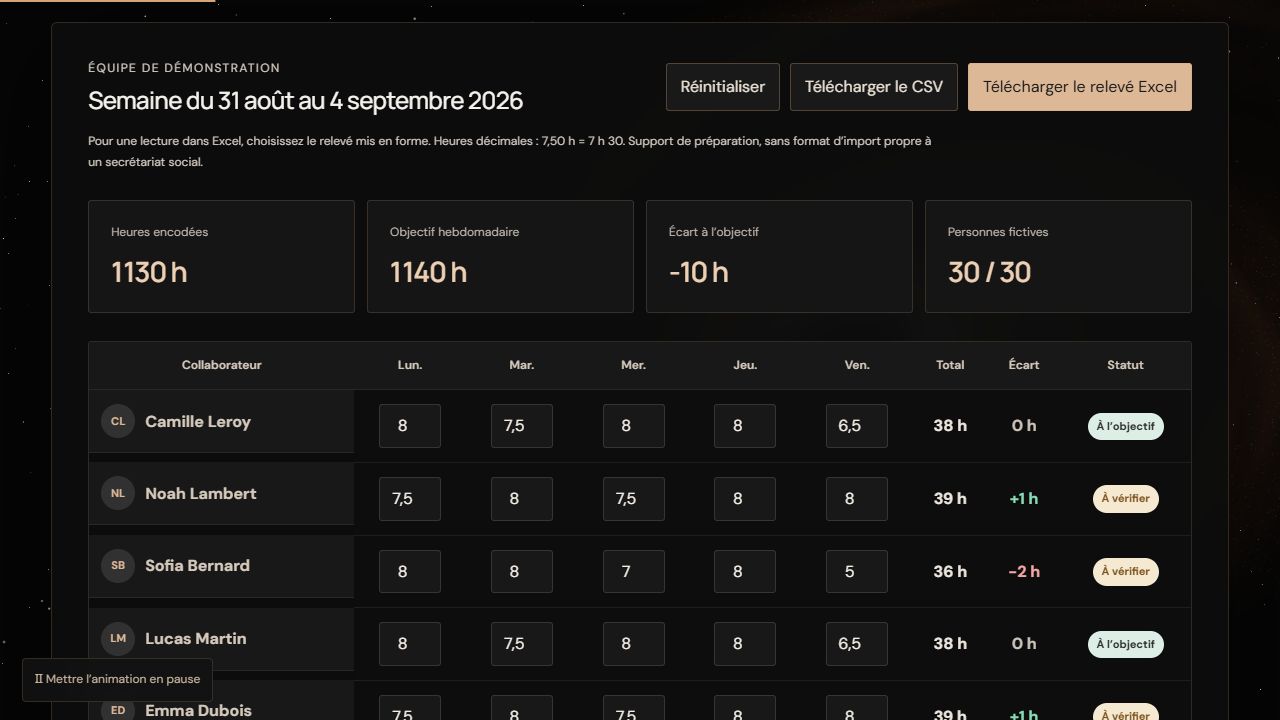
Open the simulation using the link below.
Change the hours of a fictional team member.
Compare the total and the difference from target before resetting.
What to look for Totals and differences update automatically. This simplified simulation contains no real BX1 data.
A missed clock event can be reported, reviewed and corrected. Justifying an anomaly has a different effect from changing a clock record: a justification explains the situation, while a correction changes the calculation input.
The original time-clock exports remain intact. Corrections form a separate layer with an author and a reason, after which results are recalculated. This keeps the origin of a result traceable rather than silently overwriting its history.
03
Show each user the relevant information
Employees view their own days and balances. Managers follow their assigned scope and handle reports. HR has the imports, settings and exports needed for overall administration.
Dashboards and Excel files provide different views of the same calculation. A local HR console supports the planned processing outside the server. The public demonstration is simplified and uses fictional data only.
Technical choices and their purpose
Calculation independent of presentation
Python handles imports and calculation rules. HTML dashboards and Excel outputs use those results. Business logic therefore goes beyond formatting a spreadsheet.
Access follows roles and scope
The internal web application uses Microsoft 365 for identification and applies permissions on the server. Individual access, team management and HR work have separate scopes.
The operational need
Tracking a team’s working hours involves more than adding numbers. People need to retrieve entered information, apply calculation rules and prepare data for administrative follow-up. The BX1 project brought these uses together in one application.
What the application brings together
Time entry is the starting point. Hour and time balance calculations use that information, which then feeds administrative reports and exports. This creates a continuous workflow between entering information and using the results.
The principle: stop rebuilding the result
Information loses value when someone must copy it or repeat the same calculation at every step. The chosen approach keeps information moving within the application and lets the calculation rules produce the corresponding results.
A concrete, observable result
The application is used by 41 people. It brings time entry, time balances and administrative exports together in one tool, keeping information available throughout the workflow.
From a real need to a usable tool
The business process connects the whole project. Screens, calculations and outputs belong together: entered information should remain understandable all the way to the report. For a new project, we start with your workflows and examples to agree on a defined scope.
Application developed for BX1. Client reference available on request.
Try the principle with fictional data
The public simulation lets you edit a fictional team’s hours and watch totals update. It illustrates the principle without providing access to BX1’s internal application or data. The 30 people in the demo are fictional and do not represent the actual workforce.